Fix Delegated Calendar Invite Issues in Microsoft 365
How-to — create a narrowly scoped INKY bypass for meeting requests regenerated by Exchange delegate rules
Written By Nathan McCurley
Last updated About 2 months ago
The short version
When a mailbox has a delegate, Exchange generates a second copy of the meeting request and delivers it to the delegate. Microsoft's delegation feature depends on that copy staying inside the tenant — once the message leaves the tenant boundary and returns, delegation breaks. Because INKY analyzes mail by routing it out of the tenant and back, delegate copies need to be excluded. A transport rule that stamps X-IPW-Ignore: True on those specific messages restores normal delegate behavior without opening a general calendar bypass.
What you'll see
Users with delegate access report one or more of the following:
The delegate receives the meeting request, but Accept, Tentative, and Decline buttons are missing or do nothing
The invite arrives as a plain email rather than a calendar item, so it never lands on the calendar
The delegate and the mailbox owner see mismatched or duplicated copies of the same invite
Responses sent by the delegate don't update the organizer's tracking
The original invite delivered to the mailbox owner is usually fine. The problem is specific to the copy Exchange generates for the delegate.
What's happening
Delegate access is implemented server-side by the Mailbox Rules Agent. When an invite arrives for a mailbox with a delegate configured, Exchange generates a new copy of the meeting request and delivers it to the delegate. Because this is a newly generated message rather than a forward, it re-enters the transport pipeline like any other inbound mail.
Microsoft's delegation feature only works while that copy remains inside the tenant. INKY analyzes mail using round-trip flow — the message is routed out of the tenant to INKY's MTA and then re-injected into Exchange. Ordinary mail survives that round trip without issue, but a delegation-generated meeting request does not. Leaving the tenant severs the delegation relationship, and the message that comes back no longer functions as a delegated invite.
Excluding these messages from INKY's mail flow keeps the delegate copy inside the tenant, which is what preserves delegation.
Messages generated this way are identifiable by two characteristics together:
The message type is
CalendaringThe
X-MS-Exchange-Generated-Message-Sourceheader matchesMailbox Rules Agent
Matching on both keeps the rule tightly scoped. Normal inbound invites from external organizers do not carry the Mailbox Rules Agent source header, so they continue to be analyzed by INKY.
Before you begin
You need Exchange Administrator or Global Administrator rights in the Microsoft 365 tenant.
First, locate your INKY reference rule so you know where to place the new rule in the priority order. Go to Exchange Admin Center → Mail Flow → Rules and find the last rule in the INKY - Annotation - block. On current installations this is typically INKY - Annotation - Ignore Recall Reports. On legacy installations, look for rules named IPW Filter - instead.
Note that rule's priority number. You'll place the new rule immediately after the last bypass rule in the group.
If you can't find either naming pattern, contact INKY Support before continuing — the base bypass rules may not be configured.
Create the rule
The fastest path is to duplicate an existing INKY annotation rule so the mode, severity, and error-handling settings carry over.
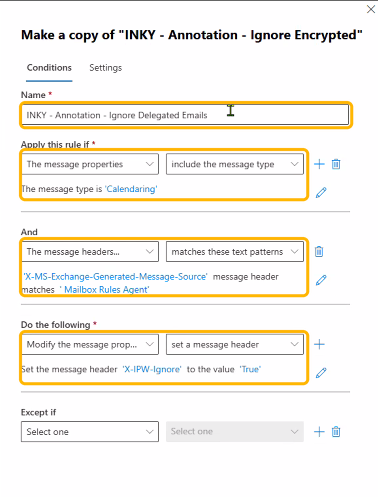
In Exchange Admin Center → Mail Flow → Rules, select INKY - Annotation - Ignore Encrypted and click Duplicate.
In the Name field, enter
INKY - Annotation - Ignore Delegated Emails.Under Apply this rule if, set the first condition to The message properties → include the message type, and choose
Calendaring.Click the + to add a second condition joined by And. Set it to The message headers... → matches these text patterns.
Enter
X-MS-Exchange-Generated-Message-Sourceas the header name andMailbox Rules Agentas the text pattern.Under Do the following, confirm the action is Modify the message properties → set a message header, with the header
X-IPW-Ignoreset to the valueTrue.Leave Except if empty.
Set the priority
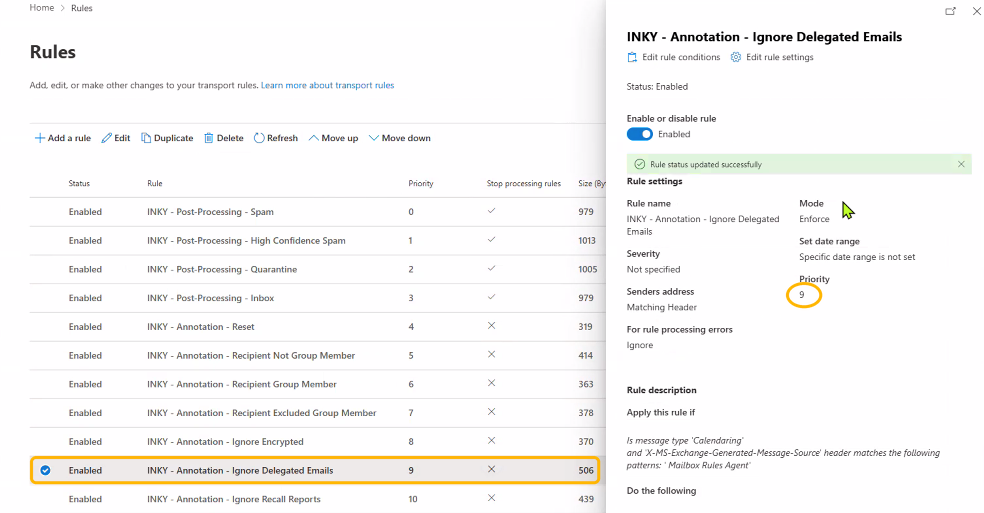
Open Edit rule settings and set the priority to one number after your INKY reference rule. In the example below, INKY - Annotation - Ignore Encrypted is priority 8, so the new rule is set to priority 9.
Confirm the remaining settings match the other INKY annotation rules:
Mode: Enforce
For rule processing errors: Ignore
Stop processing more rules: not enabled
Set date range: not set
Set the rule status to Enabled and save.
Verify
Transport rule changes can take up to 30 minutes to propagate across Exchange Online.
Once propagated, have an organizer send a meeting invite to a mailbox that has a delegate configured. Confirm that:
The delegate receives the invite as a calendar item with working Accept, Tentative, and Decline buttons
Accepting or declining updates the organizer's tracking
The mailbox owner's copy is unchanged and still carries its INKY banner
If the delegate copy is still affected, run a message trace on the delegate's address and confirm the new rule fired. If it didn't, verify the header name is spelled exactly as X-MS-Exchange-Generated-Message-Source and that the message type condition is set to Calendaring rather than a subtype.
This is not a general calendar bypass
It's important that this rule stays scoped to both conditions. Bypassing all Calendaring traffic creates a real blind spot — calendar invites are a common phishing delivery method, and a global bypass means INKY never analyzes them. Because this rule additionally requires the Mailbox Rules Agent source header, only Exchange-generated delegate copies are skipped.
The original invite from the organizer arrives from outside the tenant and does not carry that header, so it is still routed to INKY, analyzed, and annotated normally. The delegate copy is generated from a message INKY has already inspected — so scoping the rule this way avoids the blind spot rather than creating one.
If you have an existing rule that bypasses all calendaring messages, replace it with this scoped version. See Calendar Invites Bypassing INKY for related guidance.
For bypass rules built around other conditions, see Bypass INKY Protection for Specific Email in Microsoft 365.
Still need help? Ask the team