NFR Licenses for Partners
Learn how INKY's Not For Resale (NFR) program provides partners with complimentary licenses to protect their own organization.
Written By Matt Sywulak
Last updated 2 days ago
INKY provides Not For Resale (NFR) licenses to qualified partners, allowing you to protect your own organization's mailboxes at no additional cost—up to 50 users on Standalone Pro.
What Are NFR Licenses?
NFR licenses let partners protect their own organization with INKY. When you deploy INKY for your own team (not your customers), the first 50 protected users are automatically covered under your NFR allowance.
Key benefits:
Protect your own team with the same email security you offer customers
No separate configuration required—NFR is automatic when requirements are met
Available to any MSP with an active INKY contract, including INKY purchased as part of K365 User
NFR Requirements
To qualify for NFR licenses, your organization must:
How NFR Billing Works
NFR licenses apply only to the team representing your own organization—the team where your internal staff mailboxes are protected.
Example: If your MSP has 75 internal users protected by INKY, the first 50 are NFR (free) and the remaining 25 are billed as regular usage.
Choosing products for your own team
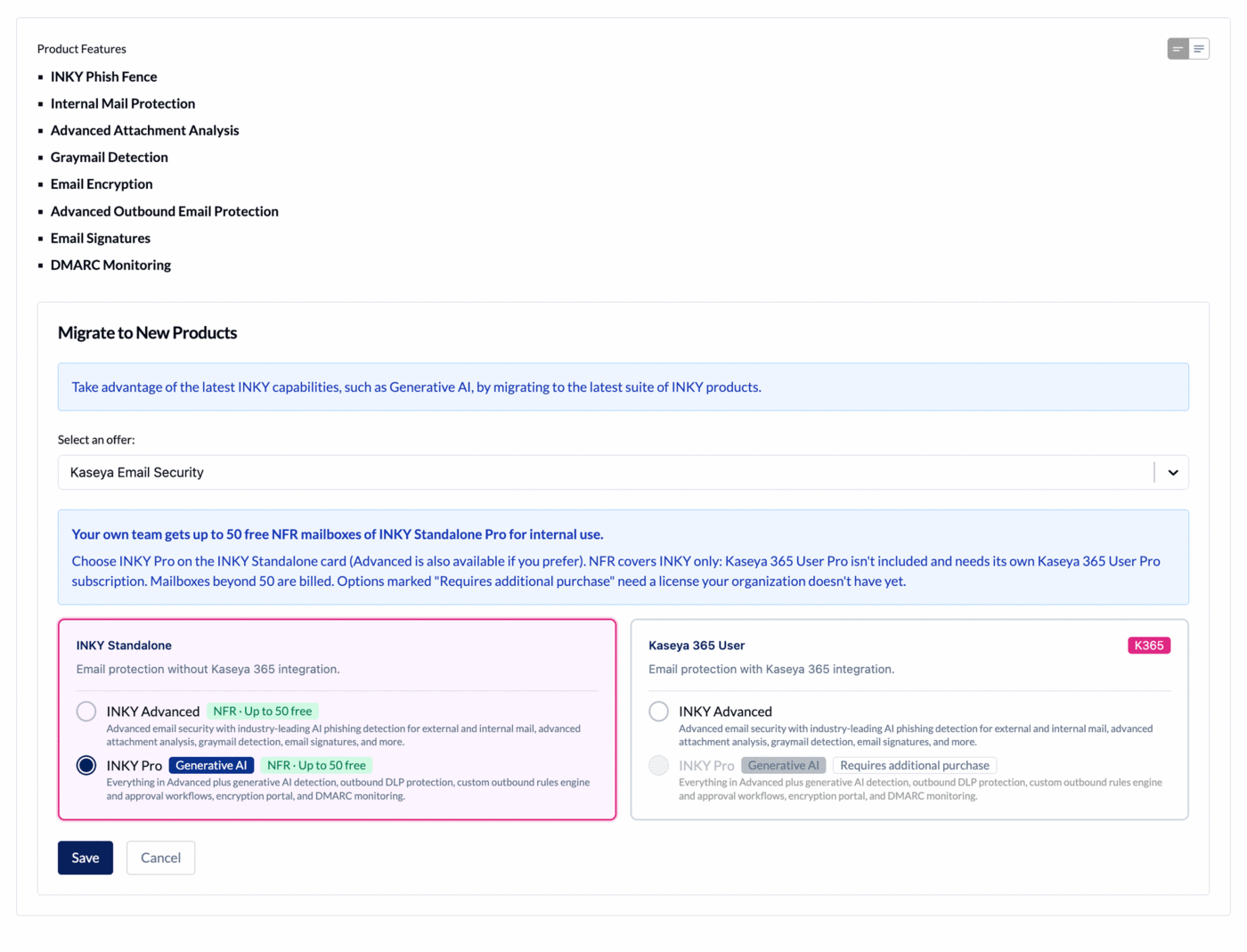
When you choose products for your own team, a note above the product cards says what your NFR allowance covers. NFR applies to the INKY Standalone card.
INKY Advanced and INKY Pro on the INKY Standalone card both carry an NFR · Up to 50 free tag.
The form opens on INKY Standalone Pro. If your organization has Kaseya 365 User Pro, the form opens on that instead.
NFR does not cover the Kaseya 365 User card. Kaseya 365 User Pro on your own team needs its own Kaseya 365 User Pro subscription.
An option tagged Requires additional purchase needs a license your organization doesn't have yet.
What NFR Does NOT Cover
Customer organizations: NFR only applies to your own MSP team, not to customer teams you manage
K365 User bundles: If you purchase INKY as part of K365 User, you still receive 50 NFR licenses of INKY Standalone Pro. NFR covers INKY only, so Kaseya 365 User Pro needs its own Kaseya 365 User Pro subscription. Other components of K365 User are not eligible for NFR coverage.
Multiple internal teams: The 50-seat NFR limit applies to your primary MSP organization team only
Common Questions
How do I know if NFR is applied to my account? If your partner hierarchy is configured correctly and you have an active INKY contract, NFR is automatic. Contact support if you're unsure about your setup.
Can I get more than 50 NFR licenses? No. The standard NFR allowance is 50 users.
Does NFR work with K365 User? Yes. If you purchase INKY through K365 User, you still get 50 NFR licenses of INKY Standalone Pro on your internal tenant. Choose INKY Pro on the INKY Standalone card. NFR does not cover Kaseya 365 User Pro or the other bundled products.
What happens if I add more than 50 users? Users beyond 50 are automatically counted toward your regular usage and billed accordingly. There's no disruption to protection.
Terms and Conditions: NFR Licenses may be used at your discretion only pursuant to the following limitations: (i) you must be an MSP; (ii) you may not deliver services to your clients or other external end users through the NFR Licenses; and (iii) you may not resell or monetize the NFR Licenses. NFR Licenses are provided "AS IS" and without warranty of any kind. Kaseya reserves the right to limit or revoke NFR Licenses at its discretion at any time. Any licenses beyond the count of fifty (50) shall be subject to payment obligations at pricing set forth on the Order for such licenses.
Still need help? Ask the team