Resolving the "Unable to discover the tenant address" error during INKY install
How-to: using your *.onmicrosoft.com domain to complete the install.
Written By Nathan McCurley
Last updated 23 days ago
The problem
When installing INKY against a Microsoft 365 tenant, you may see this error after entering your primary domain in the Domain field:

Error: Unable to discover the tenant address for this domain. Change the entry in the Domain field to the
*.onmicrosoft.comdomain for the tenant. If that still does not work, please contact support.
This happens because the installer needs the tenant's underlying *.onmicrosoft.com identity (which every M365 tenant has) rather than your custom vanity domain. The fix is to look up that *.onmicrosoft.com domain in the Microsoft 365 admin center and paste it into the Domain field.
How to fix it
Step 1. Open the Microsoft 365 admin center Domains page:
You will need to be signed in as a user with admin access to the tenant.
Step 2. In the left nav, go to Settings → Domains and locate the *.onmicrosoft.com entry in the domain list. Every M365 tenant has one — it was assigned when the tenant was first created and looks something like contoso.onmicrosoft.com or fqkwy3.onmicrosoft.com. Your primary vanity domain (the one marked Default) is the one that triggered the error, so ignore it for this step.
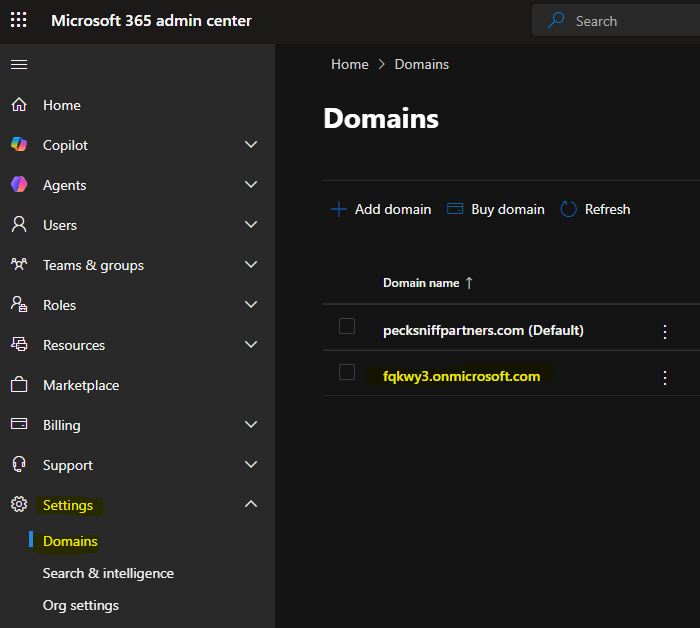
The Domains page lists both the default vanity domain and the *.onmicrosoft.com domain (highlighted).
Step 3. Copy the full *.onmicrosoft.com domain name.
Step 4. Return to the INKY installer and paste the *.onmicrosoft.com domain into the Domain field (replacing your vanity domain). Leave the other fields as they were, then click Generate License Key to continue.
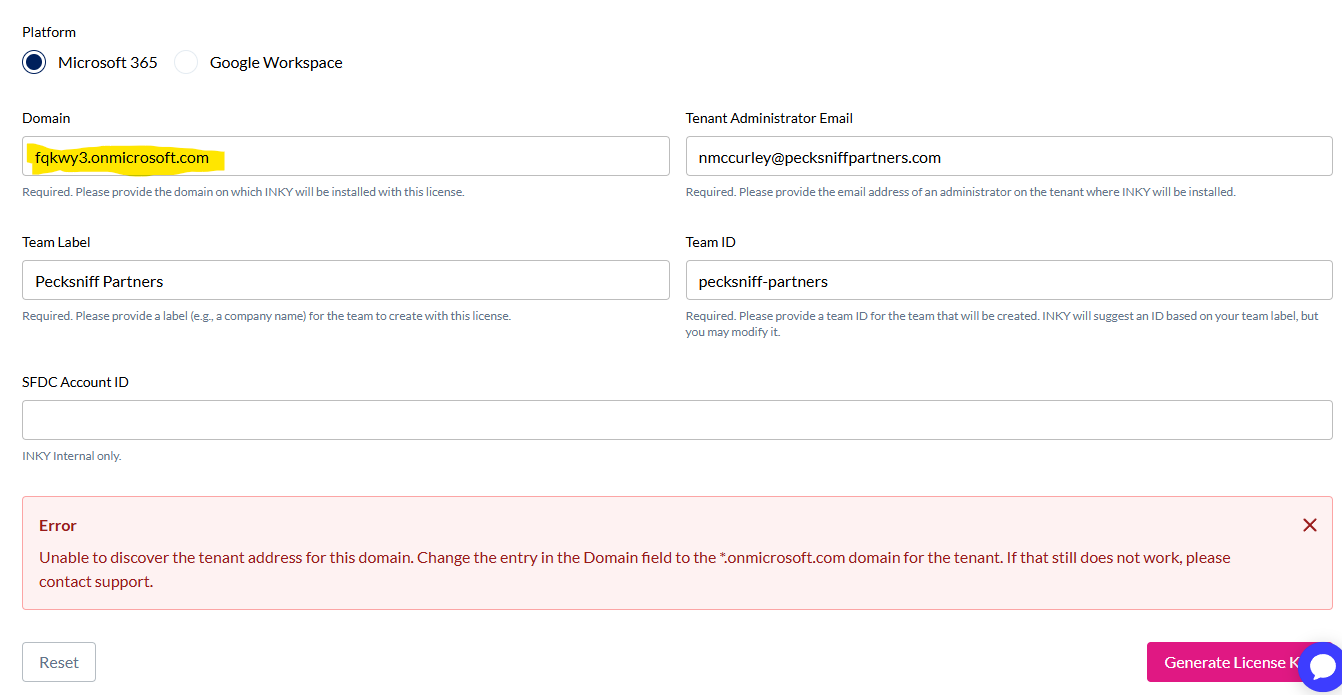
The Domain field now contains the *.onmicrosoft.com domain (highlighted). The error banner is the previous error and will clear when you click Generate License Key.
If it still does not work
Double-check that you copied the entry exactly as shown — no trailing spaces and no extra characters. If the install still fails after using the *.onmicrosoft.com domain, contact support and include a screenshot of the error along with the domain you used.
Was this helpful?
Still need help? Ask the team