"Organization settings customization has been enabled, but this has not yet taken effect" during INKY install
How-to: this is Microsoft hydrating your tenant. The installer will retry automatically.
Written By Nathan McCurley
Last updated 5 months ago
What you're seeing
Partway through an INKY install on Microsoft 365, you may see one or more entries in Latest Logs that look like this:
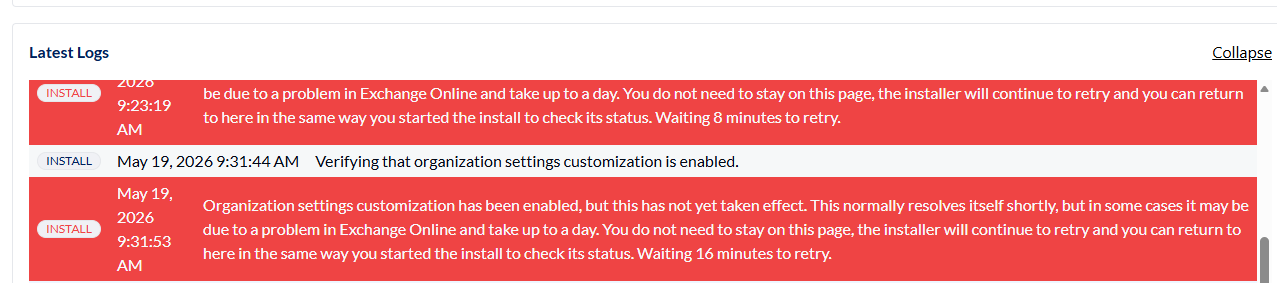
Organization settings customization has been enabled, but this has not yet taken effect. This normally resolves itself shortly, but in some cases it may be due to a problem in Exchange Online and take up to a day. You do not need to stay on this page, the installer will continue to retry and you can return to here in the same way you started the install to check its status. Waiting 16 minutes to retry.
What it means: tenant hydration
In the Microsoft datacenters, certain tenant objects are consolidated to save space. That consolidated state is called dehydrated. When you (or a tool like INKY's installer) try to modify one of those objects for the first time — through Exchange Online PowerShell or the Exchange admin center — Microsoft requires the tenant to be hydrated first.
INKY's installer triggers hydration automatically by running the Enable-OrganizationCustomization cmdlet against your tenant. While Microsoft hydrates the tenant in the background, the installer's next steps fail with the message above. This is expected behavior, not a misconfiguration on your end.
What to do
Wait. The installer will keep retrying on its own. You do not need to stay on the install page, click anything, or restart the install. Each retry interval doubles (8 minutes, 16 minutes, and so on) to give Microsoft time to finish hydration.
Hydration typically takes from about an hour to a day or two. You can safely close the page and come back later — to check status, return to the install the same way you started it (the URL you used will show the current state, including the most recent Latest Logs entries).
When to contact support
If more than two days have passed and the installer is still retrying with the same "has not yet taken effect" message, contact INKY support. Include the team name you are installing so we can trace the activity on our side.
Was this helpful?
Still need help? Ask the team