OMP Approve & Encrypt
Written By Matt Sywulak
Last updated 3 months ago
Approve & Encrypt adds a third action to outbound workflow approval notifications. When an approver receives a notification for a quarantined message, they normally choose between Approve and Reject. With this feature enabled, they also see Approve & Encrypt — which releases the message and encrypts it before delivery, without requiring the sender to take any additional action.
This is useful when a message contains sensitive content that should go through but shouldn't travel in plain text — the approver can enforce encryption as part of the approval step.
Approve & Encrypt requires INKY Pro. Contact your account team to have it enabled for your organization.
Enabling Approve & Encrypt
The setting is in Settings → Outbound Protection → Global Protection Settings.
Check Enable Approve & Encrypt option in workflow notifications. Once enabled, all outbound workflow approval notifications for this team will include the Approve & Encrypt action alongside Approve and Reject.

The feature also requires the approve-encrypt feature flag to be active for your organization. Contact your INKY account team if you don't see the setting.
How it works
When an approver receives a workflow notification email for a quarantined message, they see three actions: Approve, Approve & Encrypt, and Reject. Each is a link that opens the INKY dashboard to a confirmation page.
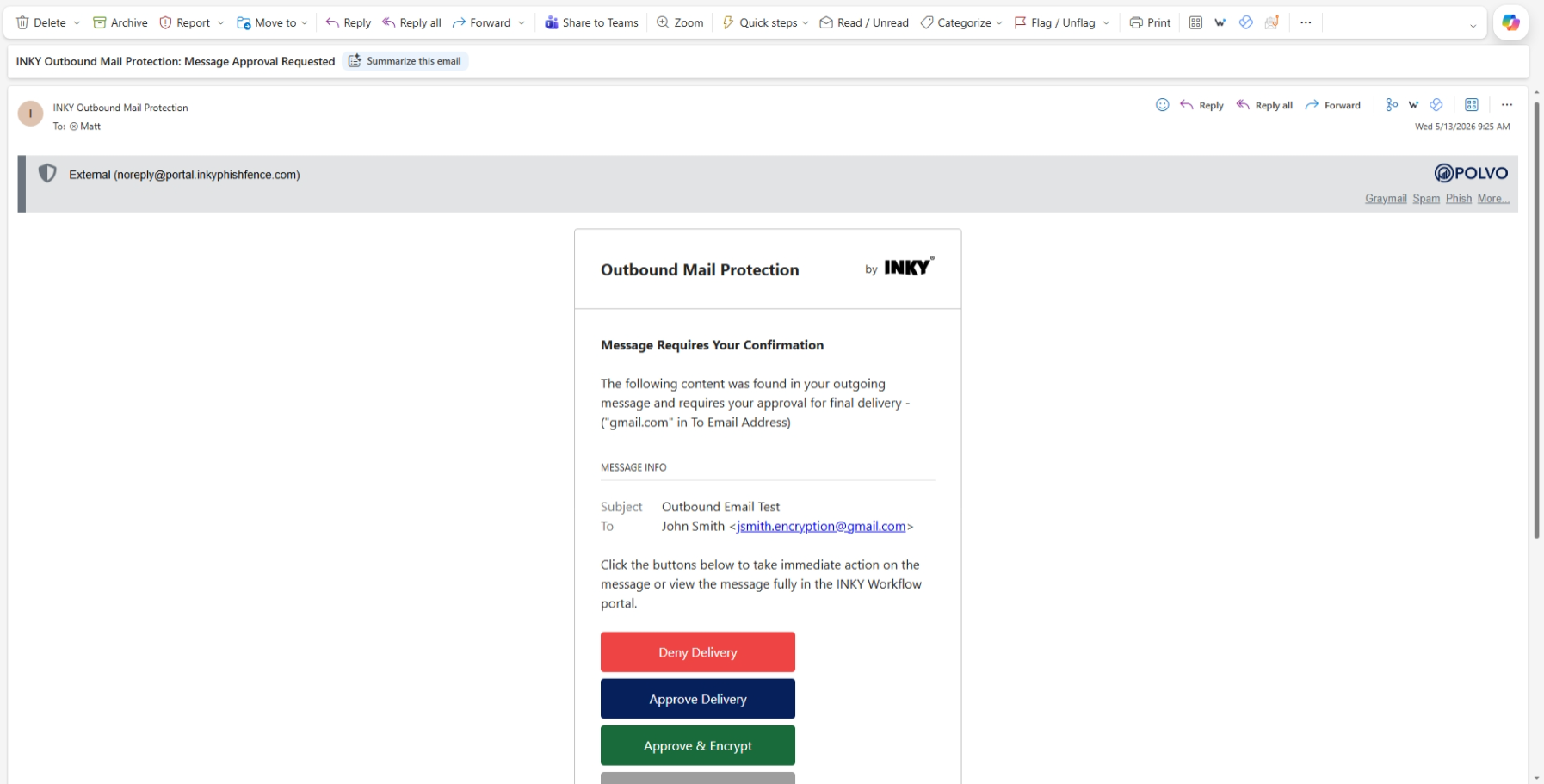
Clicking Approve & Encrypt opens the INKY dashboard to a confirmation page. Once confirmed:
The message is approved for delivery.
An encryption action is appended — the message is delivered to the recipient as an encrypted notification rather than plain text email.
The recipient receives a link to view the message securely through the INKY encryption portal.
The dashboard confirmation page shows the result: "The message has been approved and encrypted."
The message state is recorded as approved_encrypted in the workflow timeline.
When to use it
When a DLP or outbound rule catches a message with sensitive content that legitimately needs to go out, but should be encrypted for compliance or confidentiality.
When an approver wants to release a message while enforcing encryption without asking the sender to resend it.
Requirements
Outbound encryption must be licensed and configured for the team.
The approve-encrypt feature flag must be active. Contact your INKY account team if the setting isn't visible.
Permissions
No additional permissions beyond what's already required for the approval workflow. The Approve & Encrypt link works for whoever receives the workflow notification — whether that's a configured approver or the sender themselves, depending on how your Global Workflow Approvers are set up. The confirmation page validates their session in the INKY dashboard.
Still need help? Ask the team