Monitoring email while in Journal mode
Written By Eric Heller
Last updated 2 months ago
This article describes the daily monitoring tasks to perform while INKY is operating in Journal mode. Journal mode allows administrators to review detected threats, validate detection accuracy, and make informed policy decisions. This process helps prepare INKY to operate at peak efficiency before you move users to the Include Group, where INKY actively modifies or blocks email.
Prerequisite: Only users with a Super Admin or Policy Admin account can perform all Journal mode tasks.
This article includes:
A definition of Journal mode.
High-level process for monitoring email while INKY is operating in Journal mode.
Examples of how to review email by recommended threat category, including available actions.
Detailed steps for monitoring email while INKY is operating in Journal mode.
Journal mode
Journal mode is the initial phase of INKY deployment. During this phase, INKY passively monitors all inbound organizational email without altering message delivery or the user email experience. No banners, warnings, or message modifications are applied.
This mode enables administrators to observe how INKY classifies and analyzes email traffic, establish a baseline for normal activity, and identify potential threats within the environment.
Administrative Review and Tuning
The purpose of Journal mode is to identify emails that may require different handling and to refine policies accordingly. While operating in Journal mode, administrators can preview protection banners that display the threat level and category INKY assigned to each email and evaluate detection results without affecting delivery. This review helps determine which email addresses or domains to add to allowlists or blocklists and how to handle messages sent to highly targeted users within the organization.
These actions help INKY learn the organization’s preferences so when transitioning end users to the Include Group where INKY provides full protection, future emails are handled correctly and consistently based on validated policies.
Observations page
The Observations page provides access to every email processed by INKY for all teams that belong to the root organization.

Each message includes comprehensive threat intelligence, delivery routing details, and available remediation actions.
The details for each email includes options for addressing the email, comprehensive threat intelligence conveyed in the banner, and a number of analysis tabs.
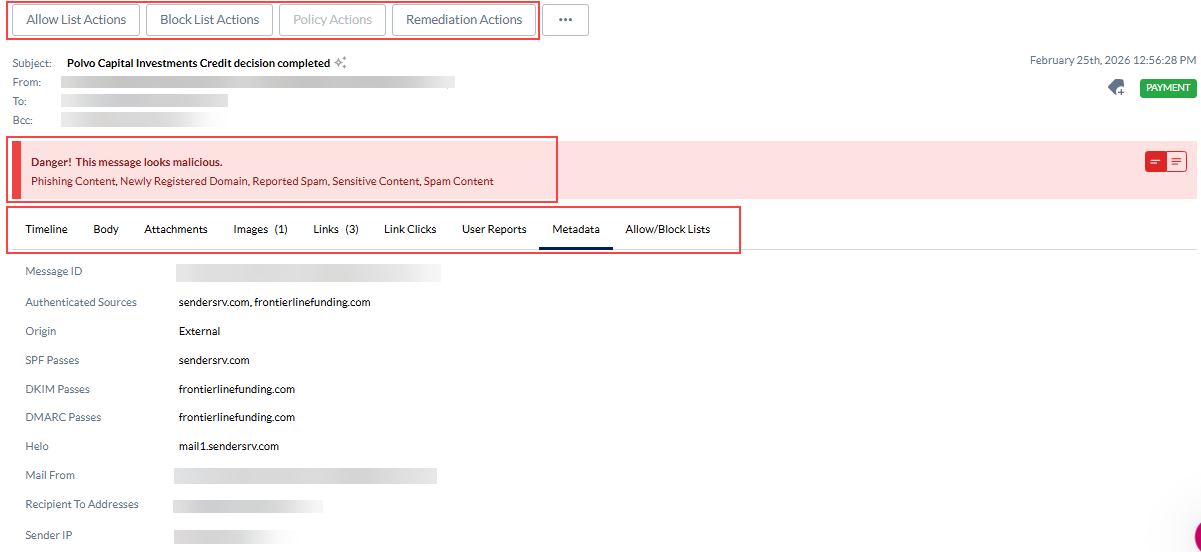
For more information about the Observations page, see Observations.
Process overview
This section describes the high-level steps admins perform to monitor emails while INKY is operating in Journal mode.
Threat category examples
This section provides an example of how to review an email for each recommended threat category and describes the actions available to you. While in Journal mode, the primary goal is to prevent legitimate emails from being incorrectly flagged by INKY.
When an email is correctly identified as malicious, you can add the sender to the block list to ensure INKY automatically blocks future emails from that sender.
How to…
This section includes the detailed steps for monitoring emails while INKY is operating in Journal mode.