Audit Log
Track all changes and actions performed in the INKY Dashboard. Super Admins get complete oversight of who changed what and when.
Written By Matt Sywulak
Last updated 12 months ago
Found at the bottom of Admin Management - INKY.
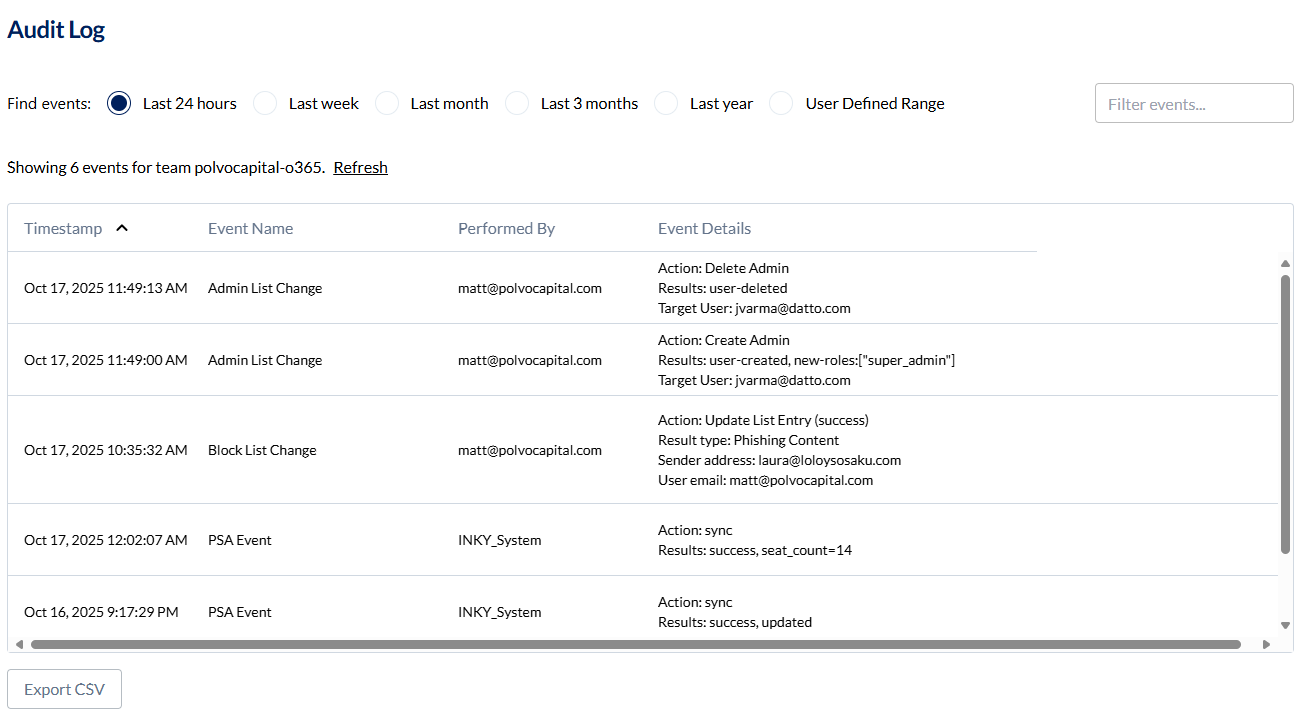
Time Range
Select from preset ranges (24 hours, week, month, 3 months, year) or define a custom date range. Export results as CSV for analysis or record-keeping.
Filter Events
Use the search bar to find specific events. Search works across all columns—type an admin's email to see their actions, or search for specific changes.
Events Table
Click any event and select More Info for additional context. Some events include deep links to related email events.
Columns
Timestamp - When the event occurred (your local timezone)
Event Name - Type of change:
Policy Change - Dashboard settings modified
Admin List Change - Admin added, removed, or modified
VIP List Change - VIP added, removed, or modified
Block List Change - Entry added, removed, or modified
Message Body Viewed - Admin viewed email content
PSA Event - System events (syncs, automated actions)
Performed By - Which admin took the action
Event Details - What specifically changed
Available in: Both bundles (Super Admin access required)
Still need help? Ask the team