Check Email Authentication on the Routing Page
Written By Matt Sywulak
Last updated About 2 hours ago
What It Does
The Routing page shows each configured domain's SPF, DKIM and DMARC records as DNS publishes them, so you can see at a glance whether a domain is set up to let INKY send on its behalf and whether receivers can verify its mail.
Where to Find It
Navigate to Admin Center > Routing. Each domain in the domain list has an Email authentication row.
The row says when the domain was last checked ("Email authentication checked" with the date and time). Select Check again to look the records up now, for example after you change DNS.
What Each Check Means
SPF
Lets INKY send as this domain. The SPF record includes INKY. Nothing to do.
Leaves out some of INKY's sending addresses. The record includes only part of INKY. Select Show which to see the addresses it leaves out.
Does not let INKY send as this domain. Mail INKY hands back to your mail platform can fail SPF. Add INKY to the record, as described in Update Your SPF Record for INKY.
No SPF record is published. The domain has no SPF record at all.
More than one SPF record is published. Receivers read none of them. Combine them into one record.
Receivers read the SPF record as an error. The reason is shown next to it.
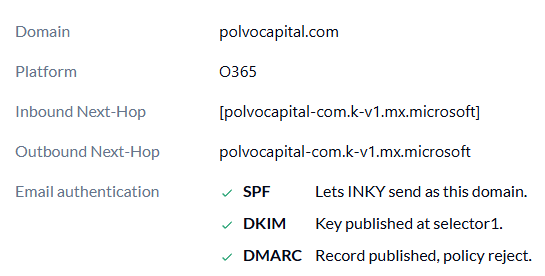
DKIM
Key published. A DKIM key was found at the selectors listed.
No key at the selectors INKY tried. INKY checks the usual selectors for the domain's mail platform (for example Microsoft 365 or Google Workspace). Turn on DKIM signing in your mail platform and publish its keys.
INKY has no DKIM selector to try. INKY does not know which selectors this domain's mail platform uses, so it cannot check DKIM.
DMARC
Record published, with its policy. The policy (none, quarantine or reject) is shown.
No DMARC record is published.
The record is broken. Receivers ignore it until it is fixed.
Domains Your Provider Publishes
Some domains, such as contoso.onmicrosoft.com, are published by Microsoft or Google rather than by you. For these the row says the provider publishes the domain's DNS, so there is nothing to change.
If a Check Fails
Could not check: DNS did not answer. The DNS lookup for that record timed out or failed. Select Check again later.
INKY could not check email authentication. None of the domains could be checked. Reload the page or try again later.
Related Articles
Was this helpful?
Still need help? Ask the team