Organization outbound rules and inheritance
Written By Matt Sywulak
Last updated About 2 hours ago
Overview
Organization outbound rules let an organization own an outbound rule and apply it to every team beneath it. You set a policy once instead of repeating it on every team.
Organization outbound rules are a beta feature, and INKY turns them on per organization. If your organization's Outbound Protection page has no Tenant Rules section, organization rules are not on for it yet.
For outbound rules in general, see Outbound Mail Protection.
Creating an organization rule
Select the organization, open Settings, then Outbound Protection. Add Rule in the Outbound Protection Rules list creates a rule the organization owns. Every team beneath the organization inherits it.
Moving your teams to organization rules
When INKY adds your organization to the beta, its Outbound Protection page can open on Migrate to Organization Rules. The wizard creates the default outbound rules on the organization and removes matching copies from its teams.
Org Default Rules. Choose which default rules the organization creates, and whether each one starts enabled. Then select Next: Review Team Rules.
Migrate Team Rules. Each team is a row you can expand. INKY ticks Remove for every team rule that exactly matches a default, and you can tick others. For each new default, choose whether each team inherits it, or has it on or off. Then select Start Migration.
Migration. The page shows progress for the organization's default rules and for each team, as Pending, In progress, Done or Failed. Retry Failed runs the failed teams again. Finalize Migration switches the page to the normal rules view.
If you leave the page part way through, the wizard opens where you left it. For a Kaseya partner's customer container, the page asks you to migrate the parent organization first
How a team sees an inherited rule
The team's own rules list groups inherited rules under an Inherited from header that names the organization. The team's own rules come last, under This team's rules.
An Org Status column shows the state of each rule at the organization.
Rules from the top of the hierarchy come first.
[SCREENSHOT: Team's own rules list, Inherited from header, Org Status column, a pin icon]
Working with an inherited rule
A team admin can't edit, duplicate or remove a rule the organization owns. They can turn it on or off for their team, or take an editable copy.
Turning it on or off for a team
Turning an inherited rule on or off affects that team only. The organization's rule doesn't change, and other teams keep whatever they had.
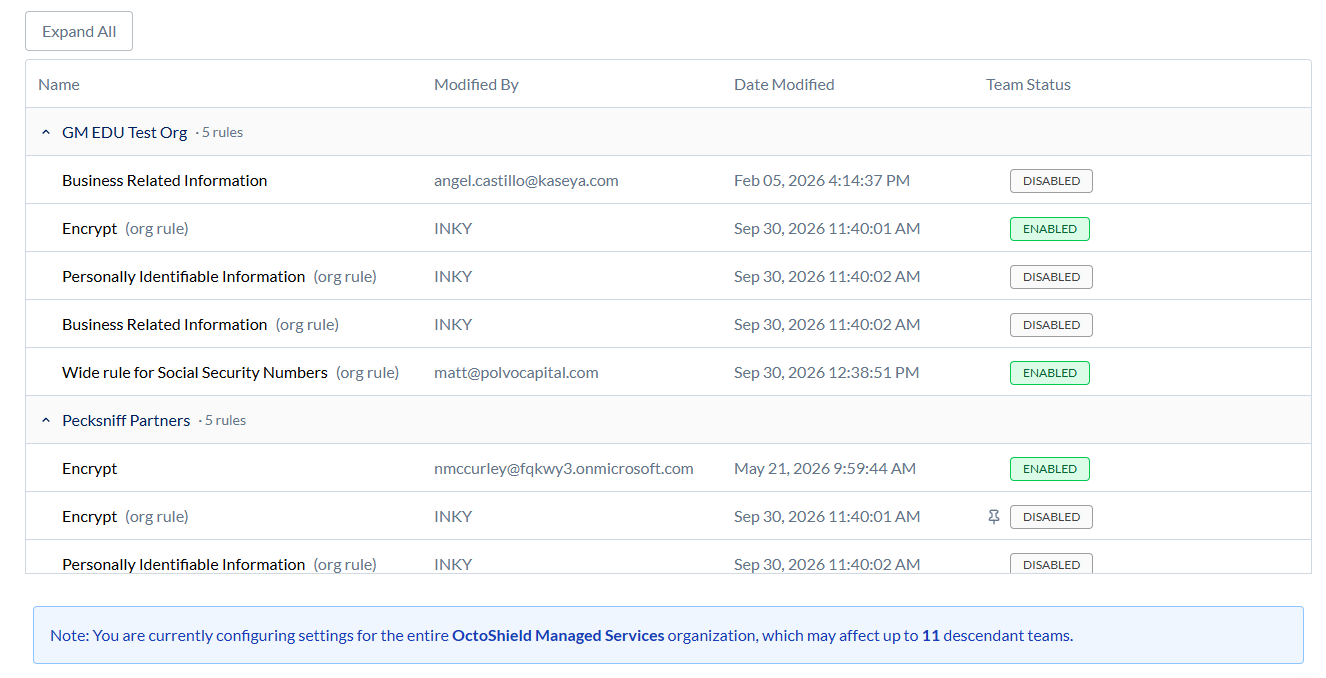
A pin icon marks a rule whose state was set on this team. Its tooltip reads "State is pinned for this team, ignoring parent state". If an organization further up pinned the state, the rule names that organization.
When you turn the rule back to the state the organization has it in, INKY asks you to choose. Inherit from parent organization means the team follows the organization from now on. Pin rule state for this team keeps the team's state whatever the organization does.
Taking an editable copy
To change what an inherited rule does, use Clone to Team. It creates a copy that the team owns and can edit.
When you save the copy, INKY turns off the organization's rule for that team, so the two don't both apply.
The copy starts disabled. Turn it on when you're ready.
You can turn the organization's rule back on at any time.
Managing your teams' rules from the organization
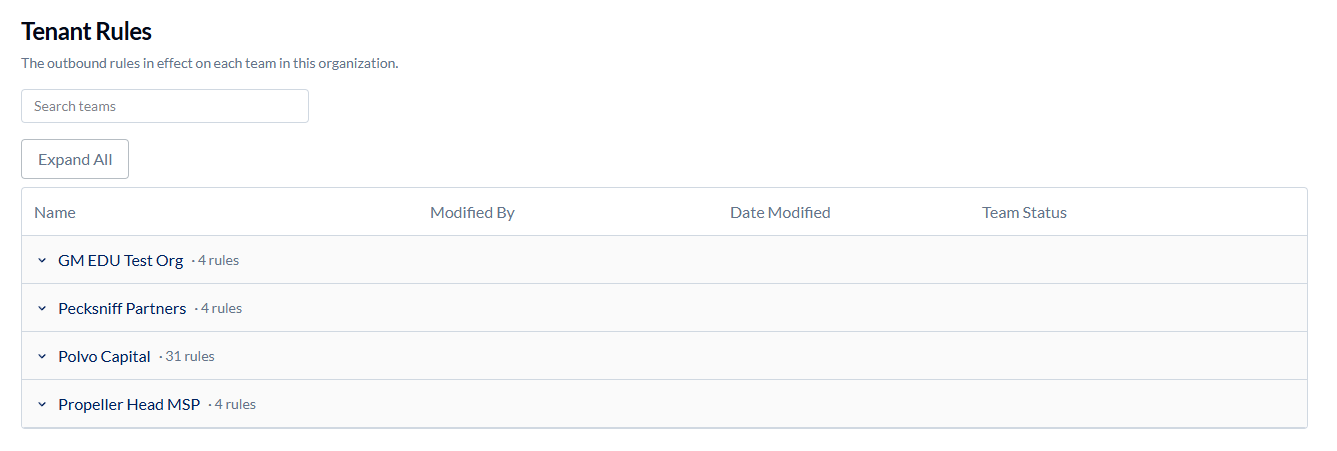
The organization's Outbound Protection page has a Tenant Rules section below its own rules list. It shows the outbound rules in effect on each team, so you can act on them without switching teams.
Each team with outbound rules is a row. Expand a row to see that team's rules, or use Expand All to open every team. Search teams finds a team by name.
Rules the team inherits from the organization are marked "(org rule)", and a pin icon shows where the team pinned the state.
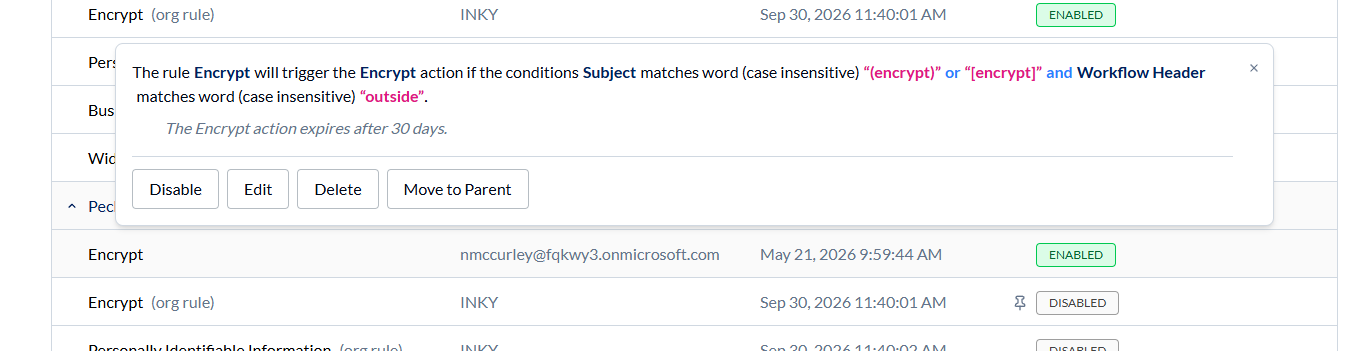
Select a rule to open its summary. You can turn any rule on or off. For an organization rule, this asks the same inherit or pin question as the team's own page.
For a rule the team owns, you can also Edit it in the same rule editor the team uses, Delete it, or Move to Parent.
Move to Parent copies the rule to the organization, applies it to all of the organization's teams, and removes the team's copy.