Usage & Billing Dashboard for Direct Customers
Monitor your mailbox usage, contract status, and product allocation from the INKY Settings page.
Written By Matt Sywulak
Last updated 8 months ago
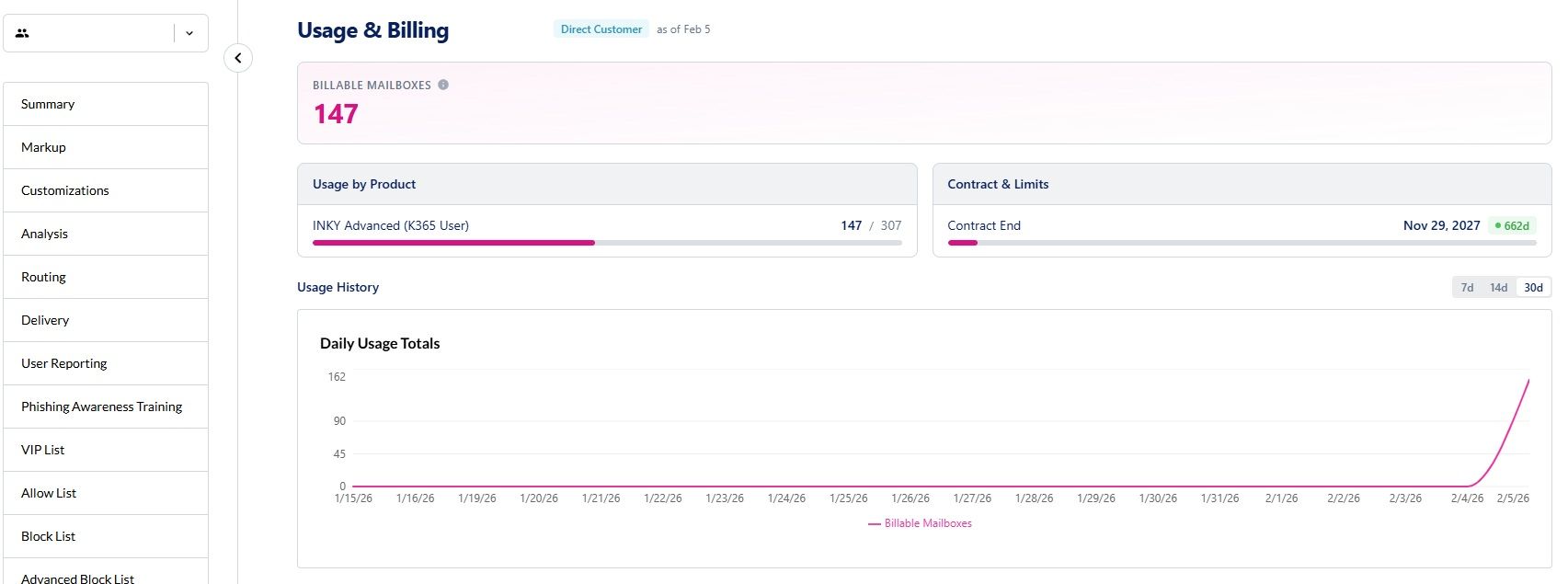
The Usage & Billing dashboard gives direct customers a clear view of their current mailbox counts, product allocation, and contract status. Navigate to Settings → Usage to access it.
Note: If your organization is managed by an MSP partner, the Usage page is accessed through your partner's account via Partner Center → Usage. You'll see a message with a link to the correct location.
Overview
The Usage page pulls data from a nightly snapshot — a batch process that records your mailbox counts each night. The "Data As Of" date at the top of the page shows when the snapshot was last taken.
Billing Metrics
At the top of the page, you'll see your primary billing metric:
Billable Mailboxes — The total number of protected mailboxes that count toward your bill
If your account has mailboxes pending migration from a prior INKY product, you'll also see a Migration Mailboxes count. These are mailboxes transitioning to your current contract and are temporarily excluded from billing.
Usage by Product
The Usage by Product panel shows your current mailbox count compared to your committed quantity. The progress bar helps you see at a glance whether you're within your commitment or approaching an overage.
Within limits: The bar shows your current usage relative to your commitment
Over committed: The bar turns red and shows the overage amount
Contract Status
The Contract & Limits panel shows your contract end date with a status indicator:
Active (green) — More than 30 days remaining
Expiring (amber) — 30 days or fewer remaining
Expired (red) — Past the contract end date
If your contract shows as Expiring or Expired, contact your account manager or Kaseya support to discuss renewal.
Historical Trends
A line chart at the bottom of the page shows your daily mailbox count over time. Toggle between 7-day, 14-day, and 30-day views to spot trends in your usage.
Managing Your Billable Users
To adjust which users are protected and counted toward your bill, manage your Include and Exclude groups:
→ Adjust Billable Users in Microsoft 365
→ Adjust Billable Users in Google Workspace
Common Questions
How often is usage data updated? Usage data is captured nightly. The "Data As Of" date shows when the most recent snapshot was taken.
Why don't I see the Usage page? The Usage page is available to accounts with an active Kaseya contract. If you don't see it, contact your account manager.
I see a message telling me to go to Partner Center — what does that mean? Your organization is managed by an MSP partner. Your usage data is viewed through your partner's account. Contact your MSP administrator for usage details.
My usage shows an overage — what happens? Overages beyond your committed quantity are billed in arrears on your next invoice. → Understanding INKY Billing
Related:
Still need help? Ask the team