AI Recommendations: the full catalogue
Every kind of recommendation AI Recommendations can produce, what has to be true before each appears, and where it lands.
Written By Matt Sywulak
Last updated About 2 months ago
This page lists every kind of recommendation AI Recommendations can produce, what has to be true before each one appears, and where it lands. It is a reference to read alongside the feature guide rather than a set of steps to follow.
AI Recommendations is a beta feature and is enabled per team. If you do not see it on your Overview page or in Settings, it is not yet switched on for your team — contact your account team.
Every sender, domain, team name and count on this page is invented, written to show what a recommendation looks like. None of it is customer data.
AI Recommendations reads your mail, your allow and block lists, your policy settings, and what the rest of the INKY customer base independently maintains, then proposes concrete changes to the administrator who can make them. Recommendations are never applied automatically.
Where a recommendation lands
Run AI Recommendations at the partner level and one pass covers every team in the organization. Each recommendation comes back aimed at the place the evidence justifies, and the card says which.
The whole organization
Applying reaches every team by inheritance. Used when the evidence comes from across the organization, or when the same change is already in place on team after team — applying once at the partner level saves repeating it.
A sender independently reported by several teams
An entry many teams already maintain by hand
A trusted third-party sender most teams have added separately
Something nearly every team blocks, but the organization does not
A single team
Applying affects that team only. Used when the evidence is local — one team's mail, one team's users, one team's lists — and pushing the change to everyone would not be justified. You still see and apply these from the same place, with the team named on the card.
A sender only one team's users are reporting
A domain being spoofed in one team's inbound mail
An overly broad or long-unused entry in one team's lists
A team-level setting that only duplicates what it inherits
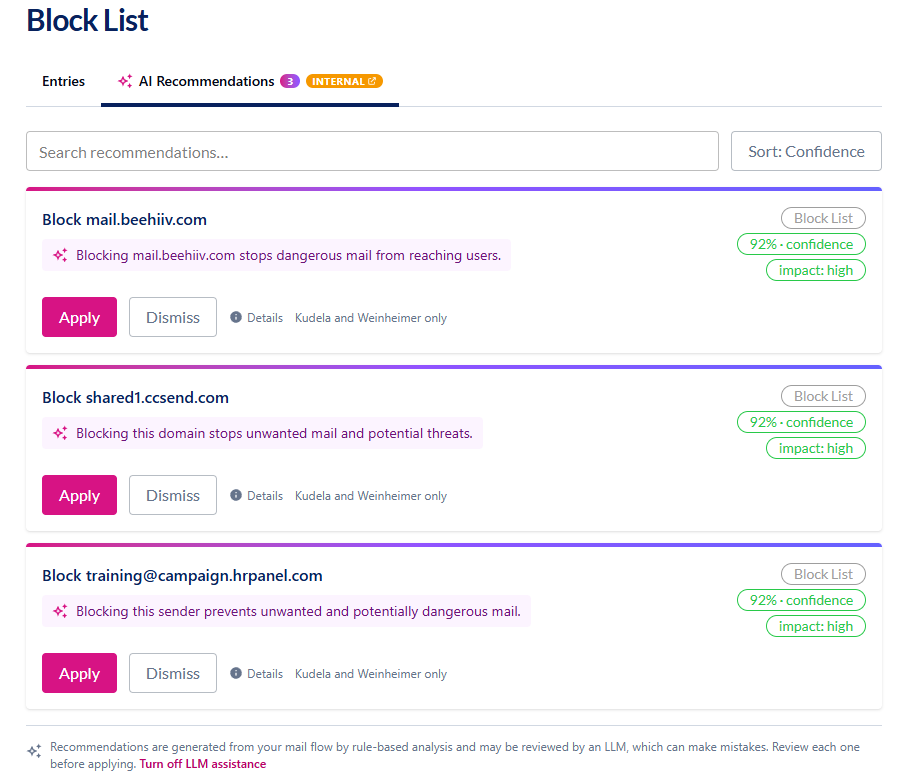
How to read a card
Allow List
Stop warning about a sender your people have shown is fine.
Senders your users keep marking safe
A sender whose mail INKY is flagging, that users keep marking safe. The recommendation switches off that one warning for that one sender — not every warning, and not for anyone else.
What has to be true
At least 2 users marked mail from the sender as safe
No dangerous mail from that sender in the window
The warning being switched off is graymail, spam or similar-to-reported-spam — never a spoofing or impersonation warning
Not a consumer mailbox provider, and not already covered by an existing entry
The handful of senders behind most of your banners
When a few senders are responsible for most of a team's banners, it is worth saying so directly. One recommendation names them and offers a single action that covers the lot.
What has to be true
At least 2 senders qualify
Between them they cause 50% or more of the team's caution banners
At least 150 caution messages in total
Every one of them independently passes the single-sender test above
A sender most INKY customers already allow
A sender that customers right across INKY have independently decided to allow, and that you are also receiving flagged mail from.
What has to be true
At least 10 organizations across the INKY customer base maintain the same allow entry
At least 100 messages from it delivered here, at least 20 of them banner-flagged
No dangerous mail from it here
You never see the count of other organizations — it only feeds the confidence score
The same allow entry, on team after team
The same allow entry, added by hand on team after team. Moving one copy up to the organization covers everyone and lets the duplicates go.
What has to be true
The identical entry exists on at least 2 teams — or 10% of the organization's teams, whichever is higher
An allow entry users keep adding one at a time
Enough individuals have added the same allow for themselves that it has effectively become a team decision. One team-wide entry replaces all of them.
What has to be true
At least 3 people have added the same entry for themselves
No team-wide entry already covers it
Block List
Start marking a sender your people keep reporting.
A sender this team keeps reporting
The straightforward case: users on a team keep reporting the same sender.
What has to be true
At least 3 user reports
Not already covered by an existing block entry
Dangerous detections, where present, raise the confidence
A sender reported across several of your teams
Several teams reported the same sender without knowing about each other. That agreement is strong enough to act on for the whole organization at once.
What has to be true
Reported at 2 or more teams — or 10% of the organization's teams, whichever is higher
At least 3 reports in total
Independent teams reaching the same conclusion is the strongest signal here
A sender reported heavily at one team
The same signal, but concentrated in one team. It does not justify a change everyone else has to live with, so the recommendation stays with that team.
What has to be true
At least 3 reports at a single team
Below the cross-team bar, so the block stays with that team rather than reaching the whole organization
A sender most INKY customers already block
A sender widely blocked across INKY's customer base that is also being flagged in your own mail. Agreement elsewhere is never enough on its own.
What has to be true
At least 10 organizations across the INKY customer base block it
At least 100 messages from it delivered here, at least 10 of them flagged
Never a whole consumer mailbox provider
Consensus alone is not enough — there has to be a local risk signal too
The same block entry, on team after team
The same block entry maintained separately on many teams, consolidated into one.
What has to be true
The identical entry exists on at least 2 teams — or 10% of the organization's teams, whichever is higher
A block users keep adding one at a time
Individuals blocking the same sender for themselves. Deliberately more cautious than the allow equivalent, because a team-wide block is imposed on people who never asked for it.
What has to be true
At least 5 people have added the same block for themselves — a higher bar than the allow equivalent
A specific address, never a whole domain
Never a consumer mailbox provider — a personal block there is a preference, not policy
Known External Senders
Recognize a legitimate outside sender, so its authenticated mail stops looking unfamiliar.
A sender most of your teams already recognize
A legitimate outside sender that most of the organization's teams already recognize. Recognizing it at the organization level settles it for everyone.
What has to be true
Listed by at least 2 other teams — or 10% of the teams compared, whichever is higher
At least 25 messages from it delivered into this scope
No dangerous mail from it
A high-volume sender one other team recognizes
A weaker version of the same signal — only one other team recognizes it — carried instead by the sheer volume of clean, authenticated mail arriving from it.
What has to be true
At least one other team lists it
At least 100 messages delivered into this scope — the volume carries what the thin cross-team signal does not
No dangerous mail from it
A sender recognized right across the INKY customer base
A sending domain recognized by customers right across INKY. It also catches the case where you have recognized one address at a domain and would be better off recognizing the whole domain.
What has to be true
At least 3 organizations recognize the sending domain
At least 100 messages from it delivered here, none dangerous
Not already recognized at the domain level
Trusted Third-Party Senders
Let a named third party send as one of your own domains without tripping the spoofing warning.
A recognized service sending as your own domain
A legitimate service — a marketing platform, a ticketing system — sending mail as one of your own domains and failing authentication for it, which looks exactly like spoofing. Here INKY worked out which service it really is, and offers to trust it by name.
What has to be true
At least 50 spoofing warnings for that domain
They account for 25% or more of the domain's inbound mail — or 100 warnings outright
No user reported any of it as phishing or spam
INKY could identify the service it really authenticates as
An unrecognized third party sending as your own domain
The same situation where INKY identified the domain doing the authenticating but does not recognize it as a named service. The recommendation names the raw domains instead, and is less confident.
What has to be true
The same conditions as above
The authenticating domain was identified, but is not a service INKY recognizes by name — so the card names the raw domains and lands at a lower confidence
A trusted sender most of your teams added separately
Several teams have separately decided to trust the same third-party sender. Setting it once at the organization covers the rest and lets the copies go.
What has to be true
At least 2 teams — or 10% of the organization's teams — already trust the same pair
The organization does not trust it yet
Cleanup
Entries and settings that are unused, redundant, dangerously broad, or quietly switching off a protection.
An allow entry that trusts far too much
Two versions of the same mistake: an entry that trusts any sender at all, or one that trusts every account at a consumer mail provider.
What has to be true
Both match fields are wildcards, so the entry covers mail from any sender at all
Or the domain is a consumer mailbox provider with no address restriction, so it trusts every account there
Applying switches the entry off rather than deleting it, so it can be narrowed and switched back on
An allow entry for a lookalike domain
Someone allow-listed a domain written in a character set chosen to look like a different domain. Flagged for a human to look at, never removed automatically.
What has to be true
The allowed domain uses an internationalized (punycode) encoding or non-Latin characters
Flagged for review, never removed automatically: a legitimate one is rare but possible
An allow entry that resembles a domain you trust
An allow entry for a domain that reads like one you genuinely trust — the lookalike check INKY already runs on live mail, turned on your own list.
What has to be true
The allowed domain reduces to the same shape as one of the team's trusted domains, but is not that domain
An allow entry that switches off spoof protection
The most consequential cleanup: an entry that suppresses a spoofing or impersonation warning even for senders that fail authentication, which means a spoofer benefits from it too.
What has to be true
The entry suppresses a VIP-spoofing, brand-impersonation, lookalike-domain or internal-name warning
And it applies even when the sender fails authentication
Applying tightens the entry rather than removing it
An allow entry nothing has matched in months
An old entry that nothing has matched in months. Harmless individually, but they accumulate, and every one is a suppression nobody is watching.
What has to be true
The entry is more than a year old
No mail has matched it in the last 180 days
Entries keyed on a display name or a bare wildcard are skipped — there is no way to tell whether they are still doing anything
A block entry nothing has matched in months
The same tidy-up on the block list.
What has to be true
The same test, applied to the block list
Recognized senders a team already inherits
A team keeping its own copy of senders it already receives from the organization. Removing the copy changes nothing about which senders are recognized.
What has to be true
The team's own entry is also handed down from the organization
These lists combine down the hierarchy, so removing the local copy changes nothing
Skipped where the team has deliberately chosen to replace the inherited list instead of adding to it
Trusted senders a team already inherits
The same duplication, in the trusted third-party sender settings.
What has to be true
The same test, applied to trusted third-party senders
Blocked countries or file types a team already inherits
A team blocking the same countries or file types the organization already blocks on its behalf.
What has to be true
The setting is on a short, deliberately curated list of settings this feature will touch
The team's values duplicate ones it already receives from the organization
Settings pinned to the value they already inherit
A team pinning settings to exactly the values it would inherit anyway. Clearing them means the team also picks up future changes made at the organization level.
What has to be true
The team overrides a curated setting to exactly the value it would inherit anyway
One combined recommendation covers all of them
The recommendation names the settings without their values, deliberately
Something nearly every team blocks, except the organization
The reverse direction: something almost every team already blocks, that the organization does not.
What has to be true
At least 3 teams in the organization
90% or more of them already block the value
The organization does not — so moving it up imposes it on the few holdouts, which the recommendation says out loud
The AI review
A model reads the strongest candidates after the analysis has run. It can only weaken or explain what was found — it never invents a recommendation and never changes what one does.
The AI's own read on a recommendation
When the model has something useful to add, its sentence becomes the card's headline and the original explanation moves into the detail.
What has to be true
The strongest 40 candidates in the four sender-facing categories are reviewed
A “keep” note becomes the headline explanation on the card
It explains the recommendation that was already there; it never changes what applying does
A recommendation the AI argued against
When the model judges a recommendation wrong, or the evidence too thin to justify the change, the recommendation disappears — from the list and from any saved link to it.
What has to be true
Two outcomes hide a recommendation: “this is wrong”, and “the evidence does not justify this change”
Hidden everywhere — including from a saved link, so a stale one cannot be applied
The reasoning is kept internally for tuning the feature
How the thresholds move
Every threshold quoted on this page is the balanced setting. Conservative raises each bar by half again; aggressive halves it. The same mail therefore yields fewer or more recommendations depending on how you have it set.
Before anything is shown, it is re-checked against your current settings: whatever you have already done by hand, dismissed, or applied drops out of the list.
Every example at a glance
The wording in the Example column is the product's own.
Was this helpful?
Still need help? Ask the team