Deployment Strategy
Understand how to roll out INKY protection using Journal Mode for monitoring, then phased INKY-Users group expansion for full protection.
Written By Matt Sywulak
Last updated 28 days ago
Deployment Overview
INKY uses a two-phase approach that minimizes user disruption and false positives:
Phase 1: Journal Mode (3-7 days) - Passive monitoring, no user visibility
Phase 2: INKY-Users Group - Phased rollout with full inline protection
This approach lets you tune policies with real data before users see any changes.
Phase 1: Journal Mode
What is Journal Mode?
Journal Mode sends INKY copies of all organizational email for analysis without modifying messages or adding banners. Think of it as "observe only" mode.
What happens:
INKY receives and analyzes all email
Threat detection runs in background
Dashboard shows what would have been caught
Users experience zero changes (no banners, no modifications)
You build baseline understanding of your email patterns
What doesn't happen:
No warning banners added to messages
No message blocking or quarantine
No user visibility of INKY at all
No links rewritten or attachments analyzed inline
Why Start with Journal Mode?
Tune policies before user impact
Review threat analytics to understand what INKY is catching. Build allow lists for legitimate senders before users see yellow banners on them.
Build confidence
See exactly what threats INKY detects in your environment. Verify detection accuracy without worrying about false positive complaints.
Learn your email patterns
INKY's social graphing begins building your organization's email network map. This reduces first-time sender alerts later.
Plan your rollout
Use threat data to identify which departments or users are highest risk and should be prioritized for INKY-Users group.
How Long to Run Journal Mode?
Recommended: 3-7 days minimum
3-5 days is sufficient for most organizations to:
See representative email volume
Identify obvious false positives
Build initial allow/block lists
Understand threat landscape
7-14 days for organizations with:
Complex email patterns
Many external partners
Seasonal business cycles
Risk-averse security teams
Maximum: Don't run Journal Mode for more than 14 days. The goal is tuning, not indefinite monitoring. Users need full protection.
What to Do During Journal Mode
Daily tasks (15 minutes):
Check for patterns in flagged messages
Add legitimate senders to allow list
By end of Journal Mode:
VIP list configured
Allow list includes trusted partners
Block list has known bad actors
You understand your false positive rate
Pilot group selected for INKY-Users
Note: For detailed steps on monitoring emails while INKY is operating in Journal mode, including examples of how to review and act on specific emails, see Monitoring email while in Journal Mode.
Phase 2: INKY-Users Group Deployment
What is the INKY-Users Group?
The INKY-Users group is how you control who receives full inline INKY protection with warning banners. Only users in this group see modified messages with colored banners.
Users IN INKY-Users group:
See Email Assistant (banners) on all emails
Have links rewritten for time-of-click protection
Receive GenAI threat analysis (Professional/Advanced)
Can report threats via INKY banner
Users NOT in INKY-Users group:
Remain in Journal Mode (passive monitoring only)
See no changes to their email
Still protected by backend analysis
Won't see warning banners
Processing modes: Default Processing Mode vs. Silent Mode
Understanding processing modes is critical when enabling warning banners for your users. You select the processing mode in the Opt-in vs opt-out drop-down on the Admin Center > Markup page.
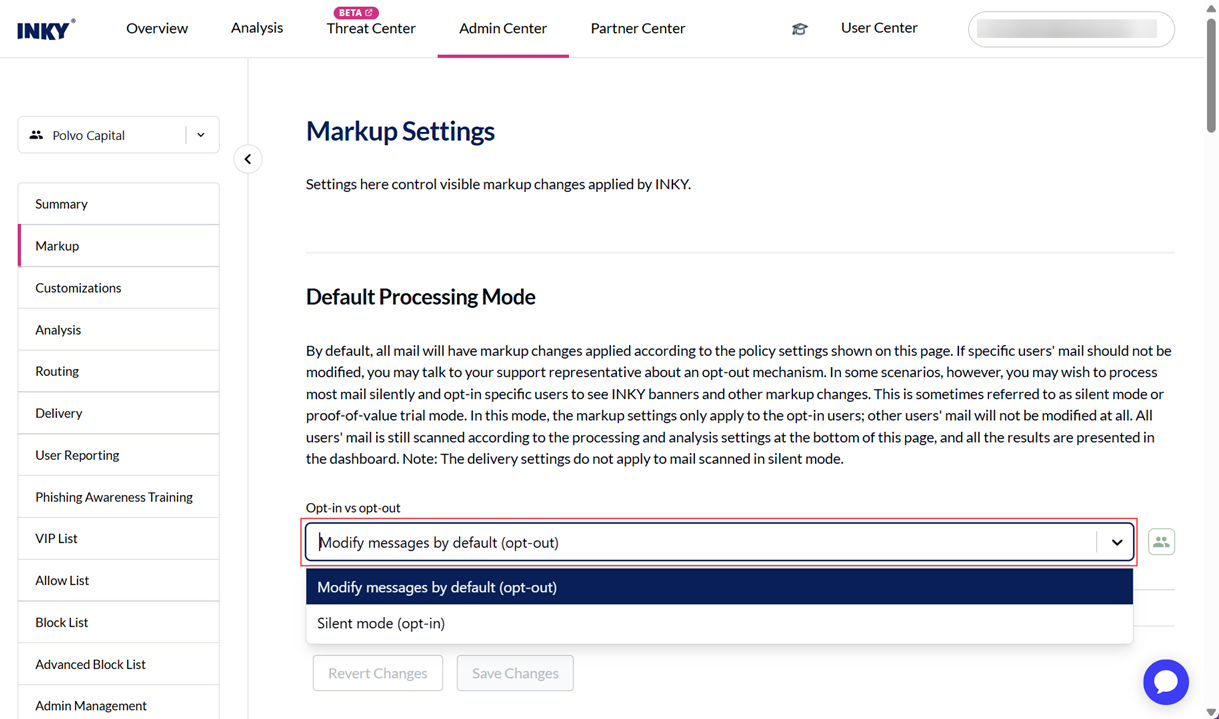
Default Processing Mode - Modify messages by default (opt-out) option
Behavior: The standard, active protection mode where INKY analyzes emails and displays interactive warning banners (Caution, Danger, Neutral) based on threat detection and social graphing.
Banner Impact: Selecting Modify messages by default (opt-out) allows warning banners to display for all users in the INKY-Users protection group (Include Group).
Silent Mode - Silent mode (opt-in) option
Behavior: Silent Mode runs INKY detection in the background while suppressing all visual warning banners.
Banner Impact: Opting into Silent Mode removes and prevents all warning banners from displaying, even for users who belong to the Include Group.
Troubleshooting missing banners:
If warning banners are not appearing for users who are members of the included group:
Verify whether Silent Mode is enabled in the INKY configuration.
If Silent Mode is enabled, select default processing mode (Modify messages by default (opt-out) option) and Save Changes.
Confirm that the affected users are still members of the Include Group group.
Learning Mode
When a new deployment completes, the team enter learning mode for 7 days.
What learning mode does:
Uses social graphing to understand email network
Prevents banner fatigue from legitimate first-time senders
Still catches and flags dangerous threats
What learning mode prevents:
Overwhelming users with caution “First-Time Sender” banners on every legitimate sender
False positive fatigue during adjustment period
User complaints about "too many warnings"
Learning mode is NOT:
Passive monitoring (full protection is active)
"Training wheels" with limited detection (all detection engines active)
Social graphing explained: INKY analyzes your organization's email network to understand normal communication patterns. While processing, INKY maps who typically communicates with whom, reducing unnecessary banners on legitimate relationships.
Phased Rollout Strategy
Recommended Timeline
Days 1-7: Journal Mode (Organization-Wide)
Enable Journal Mode for entire domain
Passive monitoring, zero user visibility
Review analytics daily
Build allow/block lists
Configure VIP protection
Select pilot group
Days 8-14: INKY-Users Pilot (IT/Security Team)
Add 5-15 pilot users to INKY-Users group
Learning mode automatically active for 7 days
Gather real-world feedback on banner accuracy
Fine-tune policies based on pilot experience
Monitor pilot user report rate
Days 15-21: Department Pilot
Expand INKY-Users to first department or location
Communicate with users before adding them
Monitor for false positive patterns
Adjust policies as needed
Celebrate early wins
Days 22-28: Policy Optimization
Review accumulated feedback from pilots
Adjust allow list, block list, VIP settings
Prepare organization-wide communication
Plan final rollout schedule
Days 29+: Organization-Wide Rollout
Add all users to INKY-Users group (can be done in batches)
Send organization-wide communication
Monitor help desk for user questions
Track user report adoption rate
Enable additional bundle features
Pilot Group Selection
Start with IT and security team because they:
Understand false positives conceptually
Can provide technical feedback on banner accuracy
Won't panic if something looks wrong
Can test reporting workflow
Become internal champions for rollout
Expand to department pilots that:
Have diverse email patterns (mix of internal/external)
Include engaged users willing to provide feedback
Represent typical user behavior (not too technical, not too casual)
Have manageable size (50-200 users ideal)
What's Next?
Ready to communicate with users?
End-User Rollout Guide →
Need to understand detection and banners?
Understanding INKY Basics →
Technical setup questions?
Platform Setup Guide →
Bottom Line: Start with Journal Mode to tune policies without user visibility, then gradually add users to INKY-Users group for full protection. Learning mode prevents banner fatigue through social graphing. The phased approach (Journal → Pilot → Department → Organization) minimizes disruption and builds confidence. Most organizations complete full rollout in 30 days with high user adoption and low false positive rates.
Still need help? Ask the team